Introduction
Modern mobile applications are expected to deliver fast, responsive, and seamless user experiences. Whether an application loads information from a remote server, retrieves records from a local database, processes images, or performs background synchronization, it must handle multiple operations efficiently without affecting the user interface. In Android development, concurrency plays an important role in achieving this objective. Developers need to perform time-consuming operations without blocking the main thread, which is responsible for rendering the user interface and processing user interactions. For many years, Android developers primarily relied on Java threads, executors, handlers, and callback-based programming to manage background operations. Although these approaches worked, they often introduced unnecessary complexity, particularly when an application needed to execute several asynchronous tasks simultaneously. Kotlin introduced coroutines as a modern solution to this problem. Coroutines provide a simpler way to write asynchronous and concurrent code while maintaining readability and improving resource management. However, an important question remains: What is the actual difference between Kotlin coroutines and traditional threads? Are coroutines simply lightweight threads, or do they work differently internally? In this article, we will explore Kotlin coroutines and threads, understand their architecture, compare their performance, examine practical Android examples, and discuss when developers should use each approach.
A Brief History of Kotlin in Android Development
In May 2017, Google announced first-class support for Kotlin on Android. Two years later, Google went further and officially announced Kotlin as its preferred language for Android development. This was a significant milestone for an ecosystem that had relied heavily on Java for many years. There were several reasons behind Kotlin's rapid adoption.
Improved Null Safety
One of the most common problems in traditional Java development is the NullPointerException. In Java, a variable can frequently contain a null value, even when developers do not expect it. If an application attempts to access a property or method on a null reference, it can crash at runtime. Kotlin addresses this problem through its type system. For example, consider the following Java code: String name = null; System.out.println(name.length()); This code can throw a NullPointerException. In Kotlin, variables are non-nullable by default: var name: String = "Android" If a variable is expected to contain null, developers must explicitly declare it as nullable: var name: String? = null Kotlin also provides safe-call operators and the Elvis operator to handle nullable values more safely. val length = name?.length ?: 0 These language features allow developers to identify and handle many null-related problems during compilation rather than discovering them through application crashes.
Less Boilerplate Code
Android applications frequently interact with listeners, callbacks, and event-driven APIs. In traditional Java development, implementing a simple click listener could require creating an anonymous class with several lines of code. Kotlin simplifies this through lambda expressions. Java: button.setOnClickListener(new View.OnClickListener() { @Override public void onClick(View view) { System.out.println("Button clicked"); } }); Kotlin: button.setOnClickListener { println("Button clicked") } The Kotlin implementation is shorter, easier to understand, and focuses more directly on the intended operation.
Seamless Java Interoperability
Another major reason for Kotlin's adoption was its compatibility with Java. Kotlin compiles to JVM bytecode for Android's runtime environment and can directly interact with existing Java classes and libraries. This means development teams do not need to rewrite an entire application to introduce Kotlin. For example, an existing Android banking application containing thousands of Java classes can gradually introduce Kotlin files without replacing its existing architecture. This incremental migration approach made Kotlin adoption practical for both new applications and large enterprise projects.
Kotlin Changed the Android Development Experience
Kotlin introduced language features that made modern Android development more convenient. Some important technologies and features include: • Kotlin Coroutines for asynchronous programming. • Jetpack Compose for declarative UI development. • Extension functions for extending existing classes. • Data classes for reducing repetitive model code. • Sealed classes for representing restricted class hierarchies. • Higher-order functions for functional programming patterns. Among these improvements, coroutines are particularly important because they fundamentally changed how Android developers handle asynchronous operations.
What Is a Thread?
A thread is the smallest unit of execution that can be scheduled by an operating system within a process. Every Android application runs with at least one main thread. This thread is responsible for handling user interface operations, including: • Drawing and updating views. • Processing user interactions. • Handling touch events. • Managing UI-related callbacks. • Updating visible application content. When developers execute a long-running operation directly on the main thread, the application may become unresponsive. For example, imagine an application downloading a large file from a server. If the download operation blocks the main thread, the application cannot process user interactions properly. This can eventually result in an Application Not Responding (ANR) error. To avoid this problem, developers traditionally execute time-consuming operations on background threads.
Creating a Thread in Kotlin
Kotlin allows developers to create a thread using the standard JVM threading APIs. fun main() { val thread = Thread { println("Background task started")
    Thread.sleep(2000)

    println("Background task completed")
}

thread.start()
} Here is what happens:
- A new thread is created.
- The start() method asks the runtime to schedule the thread.
- The background operation begins executing independently.
- The main thread can continue performing other operations.
Thread Resource Consumption
Although threads are useful, they are relatively expensive resources. Each operating system thread requires memory for its stack and additional resources for scheduling and execution. The exact memory consumption depends on the operating system, runtime, thread configuration, and platform. Creating thousands of threads can result in significant memory consumption and scheduling overhead. This is why applications generally use thread pools instead of creating unlimited threads.
Thread Switching and Context Switching
When multiple threads share processor resources, the operating system scheduler decides which thread should execute. When the processor switches from one thread to another, it may need to save and restore execution state. This process is known as context switching. Context switching is necessary for multitasking, but it introduces overhead. If an application creates too many threads, the operating system spends an increasing amount of time managing execution rather than performing useful work. For Android applications, uncontrolled thread creation can negatively affect memory consumption, battery usage, and overall performance.
What Are Kotlin Coroutines?
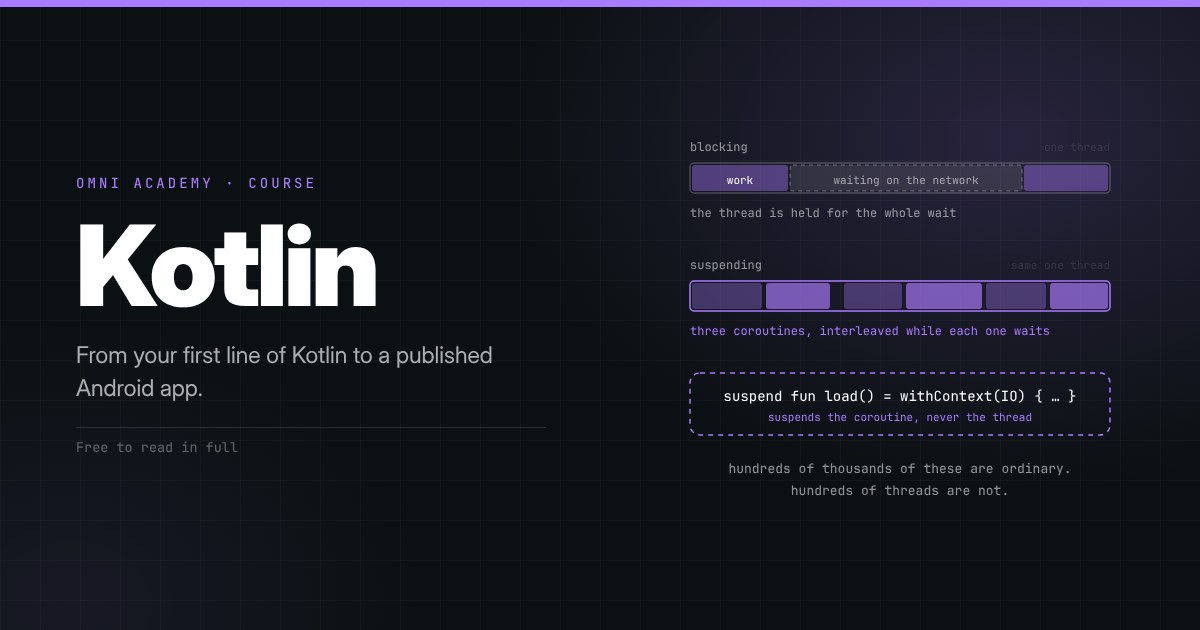
Kotlin coroutines are a language-supported mechanism for writing asynchronous and non-blocking code. They allow developers to suspend an operation temporarily and resume it later without blocking the underlying thread. Unlike traditional threads, coroutines are lightweight execution units managed through coroutine machinery and dispatchers. A coroutine does not require a dedicated operating system thread throughout its entire lifetime. For example, when a coroutine makes a network request, it can suspend while waiting for the response. The thread that was executing it can then perform other work. Once the response becomes available, the coroutine can resume execution. This is one of the most important differences between coroutines and traditional threads.
Creating a Coroutine in Kotlin
To use Kotlin coroutines, developers typically add the kotlinx-coroutines library to their project. dependencies { implementation("org.jetbrains.kotlinx:kotlinx-coroutines-android:<version>") } The version should be selected according to the project's dependency requirements. A basic coroutine example looks like this: import kotlinx.coroutines.*
fun main() = runBlocking {
launch {
    println("Coroutine started")

    delay(2000)

    println("Coroutine completed")
}
} Let's understand the important components. • runBlocking: Starts a coroutine and blocks the current thread until its coroutine body completes. • launch: Creates a new coroutine that does not directly return a result. • delay: Suspends the coroutine for the specified duration without blocking its thread. An important distinction is that runBlocking is generally useful for examples, tests, and bridging blocking code. It should not normally be used on Android's main thread.
Why Are Coroutines Lightweight?
Coroutines are lightweight because they do not require a separate operating system thread for every coroutine. The Kotlin compiler transforms suspend functions into state machines. A suspend function typically receives an additional continuation parameter in its compiled representation. This continuation stores information required to resume execution. When a coroutine suspends:
- Its current execution state is preserved.
- The necessary local variables and execution state are stored.
- The current thread becomes available for other work.
- The coroutine resumes when its suspended operation can continue. The coroutine may resume on the same thread or a different thread, depending on its dispatcher and execution context. This approach avoids keeping an operating system thread blocked simply because an operation is waiting for a network response or another asynchronous event.
Kotlin Coroutines vs Threads: Key Differences
Although both coroutines and threads allow applications to perform multiple operations, their execution models are different. The following table highlights the main differences. Feature Threads Coroutines Execution unit Operating system thread Lightweight execution unit Memory consumption Relatively high Relatively low Creation overhead Higher Lower Scheduling OS/runtime Coroutine dispatcher and runtime Suspension Blocking or asynchronous APIs Suspend and resume Context switching OS-managed thread switching Coroutine state transitions and dispatching Scalability Limited by thread resources Supports large numbers of concurrent tasks Parallel execution Yes, with multiple threads and cores Yes, when dispatched across multiple threads Cancellation Requires explicit thread interruption or coordination Structured cancellation support Code readability Can become complex Often sequential-looking Resource management Requires careful management Structured concurrency simplifies lifecycle management
Memory Consumption
One of the most significant differences is memory consumption. An operating system thread requires a stack allocation, which can be relatively large compared with the state required by an individual coroutine. A coroutine generally stores only the information required to continue its execution. As a result, an application can support a large number of suspended coroutines using a relatively small number of threads. For example, consider an application that needs to perform hundreds of network requests. Using a dedicated thread for every request would be wasteful because most threads would spend considerable time waiting for network responses. With coroutines, those requests can suspend while waiting, allowing the underlying threads to execute other tasks.
Context Switching
Traditional thread switching is managed by the operating system scheduler. Coroutine suspension and resumption work differently. When a coroutine suspends, the execution state is preserved and the thread can execute another task. The coroutine dispatcher manages when and where the coroutine resumes. This does not mean coroutine execution is completely free. Dispatching, continuation management, synchronization, and thread scheduling still have costs. However, coroutines avoid the requirement of dedicating a thread to every concurrent operation.
Scalability
Threads are useful, but creating an excessive number of them is not a scalable solution. Imagine an application handling 10,000 network requests simultaneously. Creating 10,000 operating system threads would consume substantial resources. Coroutines provide a more efficient approach because many operations can remain suspended while waiting for external resources. A relatively small thread pool can support a much larger number of concurrent coroutines. This is particularly valuable in applications that perform network communication, database operations, and background synchronization.
Do Coroutines Execute in Parallel?
This is one of the most misunderstood concepts in Kotlin coroutine development. Coroutines do not automatically execute in parallel. They provide concurrency, but parallel execution depends on the dispatcher and available execution resources. Concurrency means multiple tasks can make progress during overlapping periods. Parallelism means multiple tasks are actually executing simultaneously, generally on different processor cores. Consider the following example: fun main() = runBlocking {
launch {
    println("Task 1 started")
    delay(1000)
    println("Task 1 completed")
}

launch {
    println("Task 2 started")
    delay(1000)
    println("Task 2 completed")
}
} Both coroutines can make progress concurrently. However, because delay() suspends instead of blocking, the execution does not require two dedicated threads. Now consider CPU-intensive operations. suspend fun calculate() { var result = 0L
repeat(100000000) {
    result += it
}

println(result)
} This function performs CPU-intensive calculations. If several instances execute on a single thread, they cannot perform their CPU calculations simultaneously. To distribute CPU-intensive tasks across available processor cores, developers can use Dispatchers.Default. suspend fun performCalculations() = coroutineScope {
val task1 = async(Dispatchers.Default) {
    calculate()
}

val task2 = async(Dispatchers.Default) {
    calculate()
}

task1.await()
task2.await()
} Here, async creates coroutines that return results through Deferred. The Default dispatcher uses a shared pool of threads designed for CPU-intensive work. This allows multiple calculations to execute in parallel when sufficient processor resources are available.
Understanding Kotlin Coroutine Dispatchers
Dispatchers determine which thread or thread pool executes a coroutine. Kotlin provides several commonly used dispatchers.
Dispatchers.Main
Dispatchers.Main is used for operations that need to interact with the Android user interface. For example: withContext(Dispatchers.Main) { textView.text = "Data loaded successfully" } Typical use cases include: • Updating TextViews. • Displaying progress indicators. • Updating UI state. • Handling UI-related operations. Android UI components should generally be accessed from the main thread.
Dispatchers.IO
Dispatchers.IO is designed for blocking input/output operations. Examples include: • Network operations using blocking APIs. • File reading and writing. • Database operations using blocking APIs. • Accessing external resources. Example: suspend fun loadFile(): String { return withContext(Dispatchers.IO) { // Perform blocking file operation "File content" } } An important point is that not every suspend function needs to use Dispatchers.IO. For example, Retrofit suspend APIs and Room suspend queries generally manage their own asynchronous execution appropriately. Developers should avoid unnecessarily switching dispatchers around APIs that already handle this.
Dispatchers.Default
Dispatchers.Default is designed for CPU-intensive operations. Typical examples include: • Sorting large collections. • Image processing. • Data transformations. • Complex calculations. • Processing large datasets. Example: suspend fun processData(): List<Int> { return withContext(Dispatchers.Default) { (1..100000).sortedDescending() } }
Dispatchers.Unconfined
Dispatchers.Unconfined starts a coroutine in the current call frame until its first suspension point. After suspension, the coroutine resumes in the execution context determined by the suspending operation. It is generally intended for specialized use cases and testing rather than ordinary Android application development.
Practical Android Example: Fetching Data Using Threads
Let's consider a practical scenario. Suppose an Android application needs to retrieve customer information from a backend API. Using traditional threads, a simplified implementation might look like this: fun fetchCustomerData() {
Thread {

    val customer = api.getCustomer()

    runOnUiThread {
        textView.text = customer.name
    }

}.start()
} Although this example demonstrates the basic approach, it has several limitations.
- A new thread is created whenever the function executes.
- Thread management becomes difficult as the application grows.
- There is no built-in structured cancellation.
- Error handling requires additional implementation.
- Managing multiple dependent operations can become complicated. Developers can improve this approach by using executors and thread pools, but the application still needs to manage the execution lifecycle carefully.
Practical Android Example: Fetching Data Using Coroutines
The same functionality can be implemented using Kotlin coroutines. lifecycleScope.launch {
try {

    val customer = withContext(Dispatchers.IO) {
        api.getCustomer()
    }

    textView.text = customer.name

} catch (exception: Exception) {

    textView.text = "Unable to load customer data"

}
} Let's understand the implementation.
Step 1: Launch a Coroutine
lifecycleScope.launch { lifecycleScope launches a coroutine associated with the Activity or Fragment lifecycle. When the associated lifecycle is destroyed, its coroutines are cancelled. This prevents many unnecessary background operations from continuing after the screen is no longer available.
Step 2: Execute the Background Operation
val customer = withContext(Dispatchers.IO) { api.getCustomer() } The operation is executed within the IO dispatcher. If the API uses a blocking call, this moves the blocking operation away from the main thread. If the API is already a properly implemented suspending API, an additional dispatcher switch may not be necessary.
Step 3: Update the User Interface
textView.text = customer.name Because the coroutine was launched from lifecycleScope on the main dispatcher, execution normally resumes on the main thread after withContext completes. This makes updating the user interface straightforward.
Step 4: Handle Exceptions
catch (exception: Exception) { textView.text = "Unable to load customer data" } The try-catch block handles failures from the operation. In production applications, developers should also handle cancellation correctly and avoid swallowing CancellationException. This example demonstrates why coroutines make asynchronous programming easier to understand and maintain.
Structured Concurrency: One of the Biggest Advantages of Coroutines
Performance and memory efficiency are important, but structured concurrency is arguably one of the most valuable features of Kotlin coroutines. Structured concurrency establishes a parent-child relationship between coroutines. A coroutine launched inside a coroutine scope becomes a child of that scope. The parent scope manages the lifecycle of its child coroutines. This provides several advantages: • Child coroutines are associated with a parent scope. • Cancellation propagates through the coroutine hierarchy. • Parent completion waits for its children to complete. • Errors can be managed through structured relationships. • Developers do not need to maintain unnecessary references to every background task.
Example of Structured Concurrency
fun loadScreenData() {
lifecycleScope.launch {

    launch {
        loadCustomerProfile()
    }

    launch {
        loadCustomerTransactions()
    }

    launch {
        loadCustomerNotifications()
    }

}
} Here, three child coroutines are launched within the lifecycle scope. When the Activity or Fragment is destroyed, the lifecycle scope is cancelled, and cancellation propagates to its child coroutines. This is much easier to manage than manually tracking and stopping several independently created threads.
Cancellation Support
Coroutines support cooperative cancellation. For example: lifecycleScope.launch {
repeat(100) {

    ensureActive()

    println("Processing item: $it")

    delay(500)
}
} If the coroutine is cancelled, ensureActive() checks whether the coroutine is still active and throws a cancellation exception when appropriate. The delay() function is also cancellable. This allows long-running coroutine operations to stop when they are no longer required. However, cancellation is cooperative. CPU-intensive code that does not check for cancellation may continue running until it reaches a cancellation check or suspension point.
Error Handling in Threads vs Coroutines
Error handling is another important consideration. With traditional threads, exceptions thrown inside a background thread do not automatically propagate to the thread that created it. Developers must handle exceptions inside the thread or implement an appropriate error-reporting mechanism. Coroutines provide more structured error-handling mechanisms. For example: lifecycleScope.launch {
try {

    val result = withContext(Dispatchers.IO) {
        repository.getData()
    }

    println(result)

} catch (exception: IOException) {

    println("Network error occurred")

} catch (exception: Exception) {

    println("Unexpected error occurred")

}
} For more complex applications, Kotlin also provides: • CoroutineExceptionHandler. • SupervisorJob. • supervisorScope. • CoroutineScope. • CancellationException. These mechanisms help developers build predictable asynchronous workflows. It is important to understand that exception propagation differs between coroutine builders. For example, async stores its result or exception in a Deferred, which is normally observed through await().
When Should Android Developers Use Threads?
Although coroutines are generally preferable for modern Kotlin asynchronous programming, traditional threads have not become obsolete. Threads remain useful in several situations.
Working With Legacy Java Libraries
Some older Java libraries require a specific thread or use blocking APIs. Developers may need to use dedicated threads or executors when integrating with these libraries.
Dedicated Long-Running Operations
Some applications require a dedicated thread for specialized operations. Examples include certain hardware integrations, legacy communication systems, or third-party APIs with thread-affinity requirements.
Java Interoperability
If an existing Android application is primarily written in Java, developers may continue using executors, thread pools, and other Java concurrency mechanisms. Kotlin applications can also work with these APIs.
Low-Level Concurrency Requirements
In certain situations, developers need direct control over thread creation, thread priority, synchronization, or thread-specific behavior. Traditional thread APIs may be more appropriate for these requirements.
When Should Android Developers Use Coroutines?
For most asynchronous operations in modern Kotlin Android applications, coroutines provide a convenient and maintainable solution. Some common use cases include:
API Integration
Coroutines work well with modern networking libraries such as Retrofit and other APIs that support suspend functions. Developers can write asynchronous network operations using sequential-looking code.
Database Operations
Room supports suspend functions for database queries and operations. For example: @Dao interface UserDao {
@Query("SELECT * FROM users")
suspend fun getAllUsers(): List<User>
} This allows database operations to be called from coroutine-based application code.
Background Data Processing
Coroutines are useful for coordinating multiple background operations, processing results, and handling dependent tasks.
Search and User Input
Applications that perform live search can use coroutines to cancel previous requests when the user enters a new search term. This prevents unnecessary work and helps ensure that the latest search results are displayed.
Multiple API Requests
Suppose a dashboard needs customer details, account balances, and transaction history. These requests can be executed concurrently: suspend fun loadDashboard() = coroutineScope {
val customer = async {
    repository.getCustomer()
}

val balance = async {
    repository.getBalance()
}

val transactions = async {
    repository.getTransactions()
}

DashboardData(
    customer = customer.await(),
    balance = balance.await(),
    transactions = transactions.await()
)
} The requests can progress concurrently, while the final result is assembled after all required operations complete. This pattern is especially useful for banking applications, e-commerce platforms, and other applications that combine data from multiple backend services.
Common Mistakes Developers Should Avoid
Even though coroutines simplify asynchronous programming, incorrect usage can still introduce performance and lifecycle problems. Here are some common mistakes.
Using runBlocking on the Main Thread
runBlocking blocks the current thread until the coroutine completes. Using it on Android's main thread can freeze the user interface. Use lifecycle-aware coroutine scopes instead.
Performing CPU-Intensive Work on Dispatchers.IO
Dispatchers.IO is primarily designed for blocking input/output operations. CPU-intensive calculations should generally use Dispatchers.Default.
Ignoring Coroutine Cancellation
Developers should not ignore cancellation signals. Long-running operations should cooperate with cancellation by using suspending functions or checking the coroutine's active state.
Creating Unnecessary Coroutine Scopes
Creating unmanaged coroutine scopes throughout an application can result in operations that outlive the components that started them. Prefer lifecycle-aware scopes or explicitly managed application-level scopes.
Assuming Every Suspend Function Runs on a Background Thread
The suspend keyword does not automatically move execution to a background thread. A suspend function can execute on the main thread unless its implementation or caller changes the execution context. For example: suspend fun calculateTotal(): Int { return withContext(Dispatchers.Default) { // CPU-intensive calculation 100 + 200 } } Understanding this distinction is essential for avoiding accidental main-thread blocking.
Performance Considerations: Are Coroutines Always Faster?
Coroutines are lightweight, but that does not mean they are automatically faster than threads in every situation. Performance depends on the type of operation, dispatcher configuration, number of tasks, memory allocation, and application architecture. For example: • For network operations, coroutines can improve resource utilization by suspending instead of blocking threads. • For CPU-intensive calculations, performance depends on available processor cores and appropriate parallel execution. • For very small operations, coroutine creation and scheduling overhead may not provide any meaningful benefit. • For blocking legacy APIs, a thread pool may still be necessary. Developers should use profiling and benchmarking rather than assuming that coroutines always provide better execution speed. The primary advantage of coroutines is that they provide an efficient and structured programming model for asynchronous operations.
Final Comparison: Which One Should You Choose?
The choice between threads and coroutines depends on the application's requirements. Requirement Recommended approach Modern Android asynchronous programming Coroutines Network requests Coroutines Room database queries Coroutines Multiple dependent background operations Coroutines Concurrent API requests Coroutines CPU-intensive calculations Coroutines with Default dispatcher Legacy Java integration Threads or executors where required Dedicated thread requirements Threads Low-level thread management Threads For most new Android applications developed using Kotlin, coroutines should be the primary choice for managing asynchronous operations. Threads remain an important underlying execution mechanism, and coroutines themselves can execute on threads. Understanding both concepts is therefore essential for Android developers.
Conclusion
Kotlin coroutines and traditional threads solve related concurrency problems, but they operate at different levels. Threads are operating system execution resources. They provide the ability to execute multiple operations concurrently and in parallel, but creating and managing large numbers of threads can introduce memory and scheduling overhead. Coroutines provide a lightweight abstraction for asynchronous programming. They allow operations to suspend and resume without requiring a dedicated thread for every task. Their biggest advantages include simpler asynchronous code, efficient resource utilization, structured concurrency, lifecycle-aware cancellation, and easier coordination of multiple background operations. For Android developers, learning coroutines is no longer just an optional improvement. It is an important part of building modern, responsive, and maintainable Kotlin applications. However, understanding how threads work remains equally important because coroutines ultimately execute using threads or other supported execution mechanisms. The key takeaway is simple: Threads provide the execution resources, while coroutines provide a structured and efficient way to manage asynchronous tasks using those resources.