Here is a bug that has shipped in a great many iOS apps.
A settings screen hands the current settings to a sheet so the reader can edit them. There is a Cancel button. The reader changes three things, thinks better of it, and taps Cancel. The sheet closes. The changes are still there.
The developer looks at the Cancel button. It dismisses the sheet and does nothing else, which is what Cancel is supposed to do. The bug is not in the button. It is one word, several files away, and it is the word class.
Two kinds of type, one difference that matters
Swift has structs and classes, and the textbook difference is a list: classes support inheritance, structs get a free memberwise initialiser, classes have deinitialisers, structs cannot be subclassed. All true, and all beside the point.
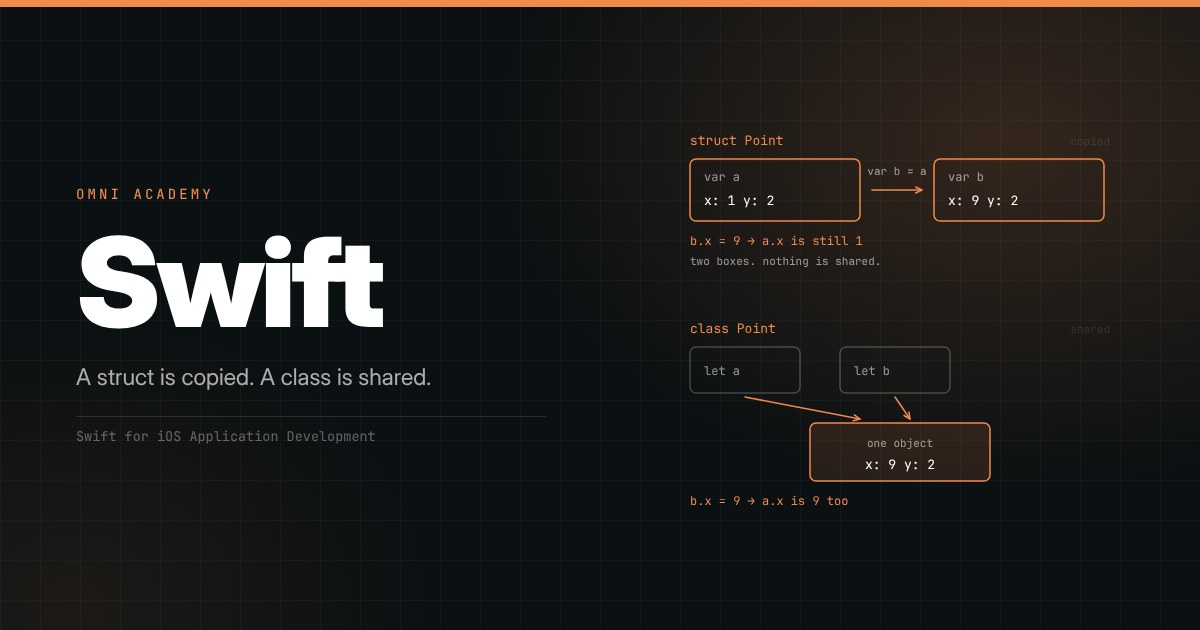
The difference that matters is what happens when you assign one to something else.
Assign a struct and you get a copy. Two names, two independent boxes, each holding its own bytes. Change one and the other does not know anything happened.
struct Settings {
    var theme: String
    var fontSize: Int
}

var saved = Settings(theme: "dark", fontSize: 16)
var editing = saved

editing.fontSize = 22

// saved.fontSize is still 16.
Assign a class and you get a second name for the same object. Two names, one box.
class Settings {
    var theme: String
    var fontSize: Int
    init(theme: String, fontSize: Int) {
        self.theme = theme
        self.fontSize = fontSize
    }
}

let saved = Settings(theme: "dark", fontSize: 16)
let editing = saved

editing.fontSize = 22

// saved.fontSize is 22 as well. There was only ever one Settings.
That is the entire bug from the opening. The sheet was handed a class, so it was not editing a copy of the settings - it was editing the settings. Cancel had nothing to undo, because nothing had been staged anywhere to undo.
Notice the detail that makes it worse: the class version compiles with let. let on a reference type means the reference cannot be pointed at a different object. It says nothing about the object's contents, which are as mutable as the class declares them. A constant that is not constant in the way you assumed is a fine way to lose an afternoon.
Where the bytes actually live
The reason for the difference is where the values are stored.
A struct's properties are stored inline, wherever the struct itself is: in a local variable, inside another struct, in an array's buffer. Assigning it copies those bytes. There is no object, no address, nothing shared. When it goes out of scope it is gone - no reference counting, no deallocation to schedule.
A class instance is allocated on the heap, and a variable holds the address of it. Assigning copies the address, which is why both names reach the same bytes. Because several names can hold the same address, Swift has to track how many: that is automatic reference counting, and it is work that happens at runtime every time a reference is made or dropped.
This has a performance consequence people get backwards. Structs are frequently faster, not slower - no allocation, no reference counting, better cache locality because the data is inline rather than behind a pointer. The instinct that copying must be expensive comes from languages where it is, and does not transfer.
"But what about a struct holding ten thousand items?"
This is the first objection everyone raises, and the answer is the most elegant thing in Swift's standard library.
var first = Array(repeating: 0, count: 10_000)
var second = first        // does this copy 10,000 integers?
No. It copies a reference and marks the buffer as shared. Arrays, dictionaries, sets and strings are value types whose storage is reference-counted underneath, using copy-on-write: the copy is deferred until somebody writes. For as long as both names only read, there is one buffer. The moment one of them mutates, that one gets its own copy and the other is left untouched.
var first = [1, 2, 3]
var second = first        // no copy yet - one buffer, two names

second.append(4)          // NOW the buffer is copied, for second only

// first is [1, 2, 3], second is [1, 2, 3, 4]
So you get value semantics - independence, predictability, no spooky action at a distance - at reference-type cost for everything that does not mutate. You can implement the same trick in your own types with isKnownUniquelyReferenced, though you rarely need to.
Which means the argument "I made it a class for performance" is almost always wrong, and worth checking with Instruments rather than assuming.
Why every SwiftUI view is a struct
Now the part that makes this more than a language detail.
Open any SwiftUI file. Every view is a struct:
struct ContentView: View {
    var body: some View {
        Text("Hello")
    }
}
Not a class. Not a subclass of anything. A struct conforming to a protocol - and it could not be otherwise, because of how the framework works.
SwiftUI is declarative. You do not build a view once and mutate it over its lifetime the way you would a UIView. You describe what the interface should look like for the current state, and when the state changes, the framework throws your view struct away, makes a new one, and compares the two to work out the smallest change to apply to the screen. That happens constantly - on every keystroke in a text field, on every frame of an animation.
That is only affordable because views are value types. Creating one is close to free: no heap allocation, no reference counting, no deinitialiser, no chance that something else is holding a reference to the one you just discarded. The framework's central design decision - rebuild the description, diff it, patch the screen - is made possible by the thing we started with. A struct is copied, so copying it a thousand times a second is fine.
It also means a SwiftUI view cannot hold state in an ordinary property. Write this and it does not work:
struct Counter: View {
    var count = 0          // this will not do what you want

    var body: some View {
        Button("Tapped \(count) times") {
            count += 1     // compile error: self is immutable
        }
    }
}
The compiler stops you, and even if it did not, the increment would be pointless: that struct is about to be thrown away and replaced by a fresh one with count back at zero. The value has nowhere to live.
This is why @State exists.
struct Counter: View {
    @State private var count = 0

    var body: some View {
        Button("Tapped \(count) times") {
            count += 1     // fine
        }
    }
}
@State moves the storage out of the struct and into memory the framework owns and keeps alive across rebuilds. The struct holds only a token pointing at it. When the value changes, SwiftUI knows to rebuild the view - and when it does, the new struct finds the same storage waiting for it.
Once you see it this way, the whole family of property wrappers stops being a list to memorise and becomes one idea with variations. The view is a disposable description; anything that must survive the next rebuild has to live somewhere else, and the wrappers are the different somewhere-elses. @State: storage this view owns. @Binding: a read-write reference to storage another view owns. @Environment: storage an ancestor or the system put in scope. @Observable: an object the framework watches for you, property by property.
And it explains the warning everyone eventually reads about marking @State private. If state belongs to this view, nobody else should be passing it in - because the value passed in would be used only on the first build and quietly ignored on every one after.
When a class is the right answer
None of this makes classes bad. It makes them specific.
You need identity. Two structs with the same contents are the same value; there is no meaningful question of whether they are "the same one". Sometimes that question is the whole point - this is the download task that is running, not an equal one. Swift gives you === for exactly this, and it only applies to references.
Something must genuinely be shared. A model several screens read and write is not something you want copied; a copy per screen is the bug, not the feature. This is what @Observable classes are for, and it is why SwiftUI's own model layer is reference types while its view layer is value types. The split is deliberate: views are descriptions and get copied, models are shared and get referenced.
You need a deinitialiser, to close a file or cancel a subscription when the object goes away. Only classes have one.
You are working with Apple's older frameworks. UIViewController, CLLocationManager, URLSession are all classes, and subclassing is how some of them are used.
The guidance in Apple's own documentation is to prefer a struct and reach for a class when you need one of those things. In practice that means most of your model types are structs, your shared state is a small number of @Observable classes, and your views are always structs because the framework gives you no other option.
Two details that bite
A let struct is deeply immutable; a let class is not. A constant struct cannot have its properties changed at all - the compiler refuses. A constant class reference can have every one of its properties changed, as long as they are var. If you want the constant to mean what it looks like it means, use a struct.
A method that changes a struct must say so. Value types require mutating on any method that writes to self:
struct Counter {
    private(set) var value = 0

    mutating func increment() {
        value += 1
    }
}
That keyword is not red tape. It is what lets the compiler know a method modifies the value, which is what lets it reject the call on a constant - and what lets let be a real guarantee rather than a hint.
What a closure captures
There is one more consequence, and it is the one that turns a language detail into a memory leak.
A closure captures the variables it mentions. What "captures" means depends on which kind of type it caught.
Capture a struct and the closure holds a copy, frozen at the moment of capture. That is usually what you want, and occasionally a surprise:
var count = 0
let printIt = { print(count) }   // captures a copy? No - see below
count = 5
printIt()                        // prints 5
Swift actually captures the variable here, not its value, so this prints 5. If you want the value as it was, capture it explicitly with a capture list:
var count = 0
let printIt = { [count] in print(count) }   // the value, copied now
count = 5
printIt()                                   // prints 0
Capture a class and the closure holds a strong reference to the object, and keeps it alive for as long as the closure lives. When the object also holds the closure, neither can ever be released:
final class Downloader {
    var onFinish: (() -> Void)?

    func start() {
        onFinish = {
            self.cleanUp()     // the closure holds self, self holds the closure
        }
    }
    func cleanUp() { }
}
That is a retain cycle, and it is the single most common leak in iOS code. The fix is a capture list that takes a weak reference instead:
onFinish = { [weak self] in
    guard let self else { return }
    self.cleanUp()
}
Structs cannot form a cycle this way, because there is no reference to retain. One more quiet advantage of the default.
The rule, in one line
Start with a struct. Switch to a class when you need identity, deliberate sharing, a deinitialiser, or an Apple framework that demands one.
Said the other way round, and more usefully for debugging: when two parts of your app disagree about a value, ask whether they are holding two copies or two names for one object. The settings sheet at the top of this article was two names. It wanted two copies, and one word - struct instead of class - would have given it them, along with a Cancel button that worked.
That is the whole of it. A struct is copied. A class is shared. Everything else in Swift, including the design of the framework you will spend most of your time in, follows from which one you picked.